
Cisco Call Reporting & CUCM CDR Reporting Software
Variphy provides Cisco call reporting and CUCM analytics designed for voice engineers, UC administrators, and IT teams managing Cisco phone environments.
Turn Cisco CUCM call detail records into powerful CDR reports, dashboards, and call analytics that help voice engineers understand call activity, troubleshoot issues, and optimize system usage.

- Deploy in 20 minutes. Full access to features. Works with existing CUCM clusters. Secure data handling. Enterprise-grade deployment.
Turn CUCM Call Data into Actionable Insights
Cisco Unified Communications Manager generates call detail records (CDR) that contain valuable information about how your voice environment is used.
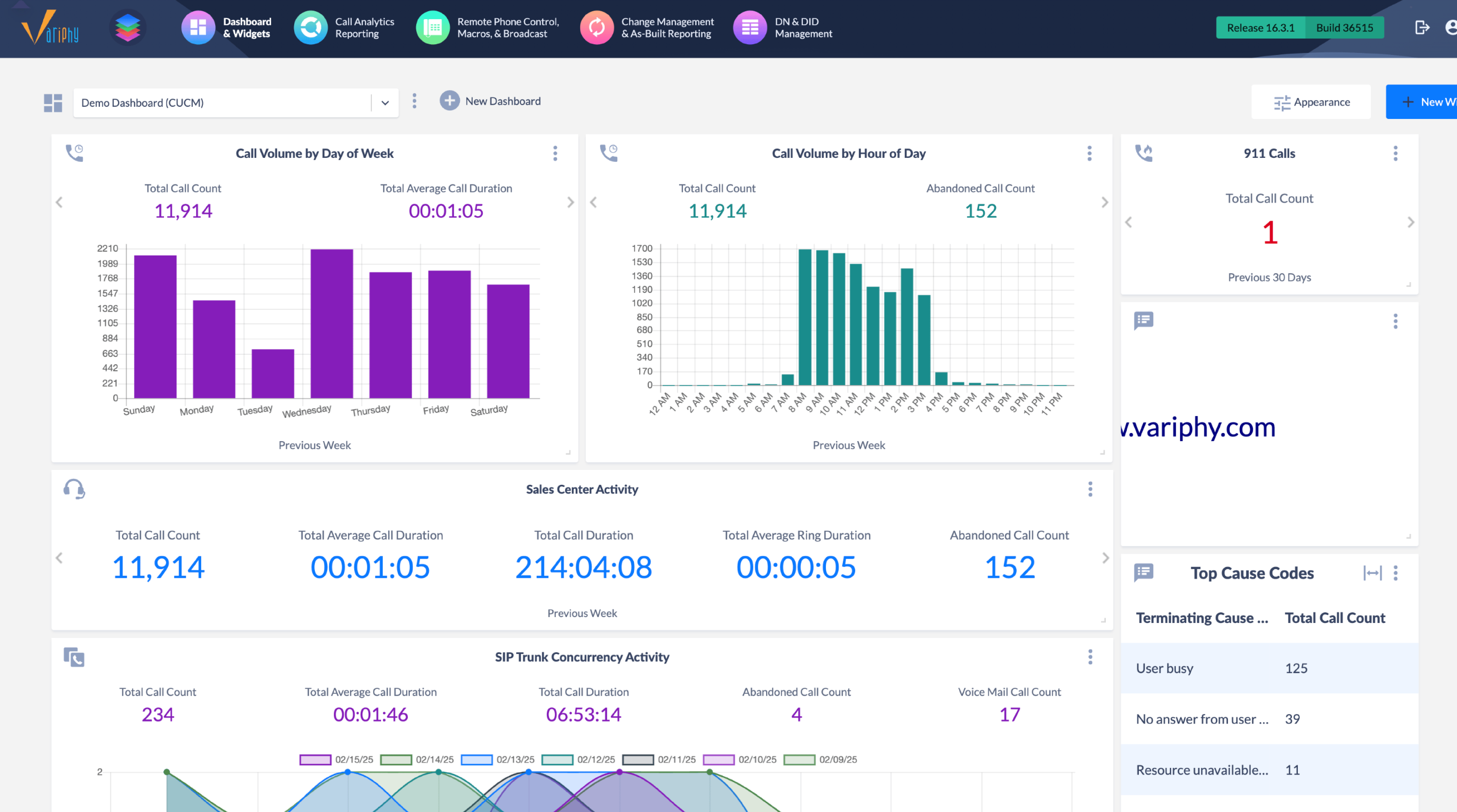
Variphy transforms these raw CDR records into searchable reports and analytics dashboards that reveal:
- Call volume trends across users and departments.
- Call failure analysis and troubleshooting insights.
- Hunt group and queue performance.
- Device and SIP trunk utilization.
- Long-term usage patterns and busy-hour traffic.
With clear reporting and dashboards, Cisco UC teams can identify problems faster, analyze usage trends, and make better operational decisions.
Built for Cisco Voice Engineers

Variphy provides dedicated CUCM reporting software designed specifically for Cisco UC environments.
Native CUCM reporting often makes it difficult to answer operational questions such as:
- When is our busiest call traffic period?
- Which departments generate the most call activity?
- Why are calls failing or not connecting?
- Are SIP trunks or gateways approaching capacity?
- How is our Cisco phone system actually being used?
Instead of manually analyzing CDR exports or building custom queries, teams can quickly generate CDR analytics dashboards and automated reports.
Key Capabilities
Custom CUCM Reporting Dashboards
Create dashboards that visualize call activity, usage patterns, and call trends across users, departments, devices, and locations.
Historical Call Analytics
Store and analyze CUCM call data over extended periods to uncover trends such as busy-hour traffic, call duration patterns, and call center performance.
Automated Reporting & Scheduling
Automatically generate and deliver reports on a daily, weekly, or monthly basis. Reports can be distributed via email or file transfer to keep teams informed without manual effort.
Device & Trunk Utilization Insights
Monitor device usage, SIP trunk capacity, and gateway utilization to ensure Cisco infrastructure is operating efficiently.
Extract structured data from hundreds of documents at the same time.
Extract structured data from hundreds of documents at the same time.
Extract structured data from hundreds of documents at the same time.
Extract structured data from hundreds of documents at the same time.
Extract structured data from hundreds of documents at the same time.
Extract structured data from hundreds of documents at the same time.
Extract structured data from hundreds of documents at the same time.
Extract structured data from hundreds of documents at the same time.
Extract structured data from hundreds of documents at the same time.
Extract structured data from hundreds of documents at the same time.
Extract structured data from hundreds of documents at the same time.
Extract structured data from hundreds of documents at the same time.
Extract structured data from hundreds of documents at the same time.
Extract structured data from hundreds of documents at the same time.
Extract structured data from hundreds of documents at the same time.
Extract structured data from hundreds of documents at the same time.
Extract structured data from hundreds of documents at the same time.
Extract structured data from hundreds of documents at the same time.
Extract structured data from hundreds of documents at the same time.
Extract structured data from hundreds of documents at the same time.
Extract structured data from hundreds of documents at the same time.
Extract structured data from hundreds of documents at the same time.
Extract structured data from hundreds of documents at the same time.
Extract structured data from hundreds of documents at the same time.
Extract structured data from hundreds of documents at the same time.
Extract structured data from hundreds of documents at the same time.
Extract structured data from hundreds of documents at the same time.
Extract structured data from hundreds of documents at the same time.
Extract structured data from hundreds of documents at the same time.
Extract structured data from hundreds of documents at the same time.
Extract structured data from hundreds of documents at the same time.
Extract structured data from hundreds of documents at the same time.
Extract structured data from hundreds of documents at the same time.
Extract structured data from hundreds of documents at the same time.
Extract structured data from hundreds of documents at the same time.
Extract structured data from hundreds of documents at the same time.
Trusted by Cisco UC Teams













Variphy Makes Reporting Effortless and Customizable
We explored various reporting options for our Cisco system, including the built-in reporting features, but none of them met our needs as effectively as Variphy. [...] It stands out for its user-friendly interface, making it incredibly easy to build custom reports tailored to our specific requirements.
Easy Cisco Call Reporting with Responsive Support and Strong Self-Help Resources
Variphy CDR Call Reporting for Cisco makes it easy to run queries for discovery and to troubleshoot issues. It also simplifies setting up reports for departments that need to understand call volumes and see the supporting details. On the UCCX side, we’ve been able to eliminate the need for CUIC dashboards and reports.
Simple, Insightful CDR Reports and a Best-in-Class Variphy Account Team
We have been strong advocates for Variphy for over a decade (throughout my entire CUCM career). It remains one of the few solutions that consistently sells itself and is supported by an account team that is truly best‑in‑class.
Frequently Asked Questions
What is CUCM CDR reporting?
CUCM CDR reporting analyzes call detail records generated by Cisco Unified Communications Manager. These records contain information about call activity, duration, endpoints, and call results. Reporting tools transform raw CDR data into dashboards and reports that help teams understand usage and troubleshoot issues.
What is Cisco call reporting software?
Cisco call reporting software analyzes call data generated by Cisco phone systems. These tools provide dashboards, analytics, and automated reports that help organizations monitor call activity, troubleshoot problems, and understand system usage.
Why is native CUCM reporting limited?
Native CUCM tools primarily generate raw call detail records. While useful, they often require manual analysis or custom queries. Dedicated reporting platforms provide dashboards, historical analytics, and automated reporting that simplify analysis.
How do you analyze call detail records?
Call detail records can be analyzed by importing CDR data into reporting tools that generate dashboards and reports. These platforms allow teams to visualize call trends, identify failures, analyze usage patterns, and monitor infrastructure performance.
