Every UC platform ships with reporting, but the gaps show up when you need regular reporting to see more, add a second platform, field a compliance request for call detail from eight months ago, or hit a migration where you need old and new side by side.
This post walks through what native tools handle well and how to decide whether a dedicated analytics platform earns its place.
Native reporting is built by the vendor who owns the data. A few things it does reliably:
CUCM CAR produces CDR and CMR based reports for call volume, top talkers, and gateway usage. Control Hub covers Webex Calling analytics for call quality and endpoint health. The Teams admin center handles Teams Phone call reporting for PSTN usage and quality.
If a user reports a dropped call, native tools find that record fast. Recent CDR and quality data sits close at hand.
Call counts and duration come standard. For capacity checks and routine health monitoring on one platform, these views hold up.
If you run a single platform, support a small user base, and field the occasional reporting request, native reporting fits.
The limits appear as you add platforms or your questions get harder. Four areas cause most of the friction:
Every native tool enforces a retention window, and you do not always control it. The numbers vary widely.
Each console reports only on its own platform. Run Cisco CUCM alongside Webex Calling and Microsoft Teams Phone, and you have three separate consoles, each with its own data model and export format. No native tool gives you broad visibility into your whole environment in one interface.
Native reports arrive in fixed formats. You get the fields the vendor chose, grouped the way the vendor decided. When you need a cut they did not anticipate, like call detail filtered by a specific DN pattern, joined to a device pool, over a custom date range, you export raw data and build it yourself in a spreadsheet. Repeated monthly across several platforms, it can take up time your IT team can spend on more important tasks.
Native reporting has no line item, so it reads as free, but the cost is real.
The biggest piece is analyst time. Every manual export and reconciliation between consoles is time an engineer spends assembling data instead of acting on it.
Lost history costs you too. When CUCM CAR data ages out around 60 days, the record is gone for good, so an old incident or the usage data behind a past capacity decision is simply unavailable.
Migrations get harder as well. When you move between platforms, native tools split your history at the cutover, so the record of what happened before the switch sits in a system you are winding down. Reconstructing a continuous view, or comparing performance before and after, becomes manual work at the point you can least afford it.
None of this shows up on an invoice, which is what makes it easy to miss.
Native reporting is enough when you run a single platform, your needs are light and mostly recent, and your retention window covers the questions you actually ask.
A dedicated reporting platform helps you save time and resources by allowing you to:
During a migration, native tools split your history at the cutover. The platform you are leaving holds everything up to the switch, the one you are moving to starts with no history. Comparing before-and-after call quality, or proving the new deployment performs, means working across two disconnected data sets at the moment you most need one.
A dedicated analytics platform sits above the individual consoles and closes the four gaps directly.
It gives you one platform across your environment. You report on Cisco CUCM, Cisco UCCX, Cisco CUBE, Webex Calling, Webex Contact Center, Microsoft Teams Phone, and Zoom Phone from one place, against a consistent data model.
It retains searchable history well beyond native windows, so the roughly 60-day Cisco CUCM ceiling stops being the limit on how far back you can look.
It holds history in the platform rather than in each vendor console, so your reporting spans a migration and you compare old and new against the same metrics.
Variphy works with major communications and collaboration platforms, which is what makes the single-view approach work across a mixed Cisco, Webex, Microsoft Teams Phone, and Zoom Phone deployment.
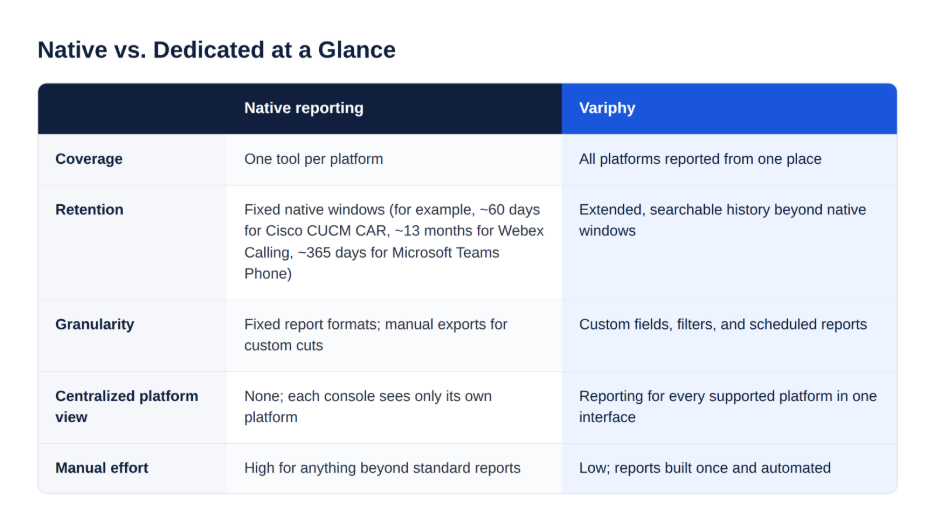
Adding a dedicated platform comes down to how many platforms you run, how far back you need to see, how much time you spend building reports by hand, and whether a migration is on your roadmap.
If those pressures sound familiar, put a number on them before you decide. Use our Reporting Cost Calculator to estimate the analyst hours your current approach consumes.
Updated on
October 16, 2026
Published on
October 16, 2026
Read Next
Subscribe to Variphy Voice to get featured posts delivered straight to your inbox.
Subscribe
Connect with us



Technology Partners





Don’t miss out on the latest insights, news, and resources from Variphy.


